
Product Users
WhatsApp users with multiple group memberships
The product targets WhatsApp users who participate in multiple groups and want to share status updates only with selected audiences, ensuring privacy and relevance.

My status
My posted statuses appear at the top.
Group status
Group statuses are displayed in a separate section.

GROUP STATUS
FEATURE
UI/UX DESIGN
tamar shuval
The Design Challenge
Giving users control over who sees what they share
There is a significant opportunity to bridge the gap between group chats and status sharing, creating a more private and relevant social layer within the app
Final Screen Delivery
Flow n.1
See Group Statuses
The Goal
Sharing personal moments with the right people
Enable users to post status updates visible only to a specific group, improving privacy and relevance of shared content.
Design Process
Why this project?
Rethinking Privacy in Status Sharing
While using WhatsApp, I identified a recurring usability gap in status sharing.
Users lack a simple way to control the visibility of personal updates, making it difficult to share content only with specific groups such as Family or Close Friends. As a result, many users choose not to share at all. This observation defined the opportunity to explore a more controlled and relevant sharing experience.
Discover
Define
Ideate
Design
Product Challenges
Why sharing feels difficult and moments get lost
No easy way to share content only with a specific group
Current process requires workarounds (manual sharing)
Time-consuming and frustrating to post content
Group chats are chaotic with hundreds of messages
Often misses key moments
User Needs
Key requirements for private and meaningful status sharing
I conducted a survey among WhatsApp users to gain insights on their need for group status updates....
After sending out multiple surveys, I concluded that the user needs
Privacy control
the ability to share status updates with only a specific group of contacts.
Relevance:
ensuring that the content reaches only the intended audience.
Ease of use
a simple and intuitive way to select groups and post statuses without extra steps.
Screen
7

Screen
4

Group Status color
Group Status uses an orange color to visually differentiate it from regular statuses and improve quick recognition.
Screen
8

Group Status interaction
When tapping on a group status, the name of the person who posted it appears at the top.
Reactions
Users can react to group statuses just like regular statuses.
Screen
8

Screen
8

My Group Status
If the status was posted by me, I can also see the number of views.
User Persona
Maya
She is 24
She is a Student
Lifestyle
Maya is an active WhatsApp user who participates in several groups like friends, family, and university. She likes sharing moments privately and values a quick, visual way to stay updated.
“I want to share this photo with my friends without my teacher seeing it.”
Features and Functionalities to solve user needs
Group-specific
status posting
Group selection
interface
One-tap
status posting
Updates screen
Statuses are clearly divided into my statuses, group statuses, and private statuses to reduce confusion and improve navigation.
Group status
This view provides full transparency, showing when each status was posted and how many people viewed it.
Screen
8

“My Statuses” details page
By tapping on “My Statuses”, users can view a detailed list of all their posted statuses — both private and group.
Private status
Private statuses are shown separately for clarity.
Screen
8

Create status
After selecting a photo and adding text, the user taps the share button to choose who to share the status with.
Choose audience
The user selects “Groups” to share the status with a specific group.
Screen
8

Screen
8

Select group
The user chooses the group they want to share the status with.
Post status
Once confirmed, the status is posted to the selected group.
Screen
8

Screen
8
Updates page
After posting, the group status appears in the Updates page.
Status insights
By tapping on the status, the user can view how many people have seen it.
Screen
8

Screen
8
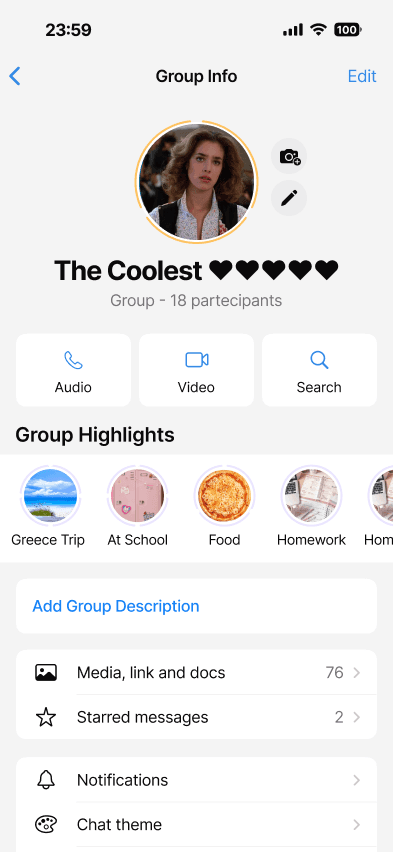
Future feature
Save group statuses as highlights in the group info page.
This feature would allow groups to save selected statuses as highlights inside the group info page, making important content easy to revisit and reducing the loss of valuable updates.
Key UX Improvements
Enhancing group communication while respecting familiar patterns
Clear visual distinction between private and group statuses.
Dedicated sections for my statuses, group statuses, and private statuses.
Consistent interaction patterns, including reactions and view counts.
Improved transparency by showing who posted each group status.
This concept aims to enhance everyday group communication without changing how users already interact with WhatsApp.
Flow n.2
Upload Group Statuses
Frustrations
Lack of privacy
Irrelevant sharing
Complicated workflow
Designing within an existing product like WhatsApp challenged me to respect familiar patterns while introducing meaningful improvements.
Experience the concept through an interactive prototype.
Try the prototype
THANK YOU FOR JOINING
NEXT PROJECT
© 2026 TAMAR SHUVAL
THANK YOU FOR JOINING
NEXT PROJECT
Tamar Shuval
WORK
ABOUT
RESUME
JANUARY 2026
WHATSAPP FEATURE
UI/UX DESIGN
Product Users
WhatsApp users with multiple group memberships
The product targets WhatsApp users who participate in multiple groups and want to share status updates only with selected audiences, ensuring privacy and relevance.
“I want to share this photo with my friends without my teacher seeing it.”
Frustrations
Lack of privacy
Irrelevant sharing
Complicated workflow
My status
My posted statuses appear at the top.
Group status
Group statuses are displayed in a separate section.
The Goal
Sharing personal moments with the right people
Enable users to post status updates visible only to a specific group, improving privacy and relevance of shared content.
GROUP STATUS
FEATURE
UI/UX DESIGN
tamar shuval
The Design Challenge
Giving users control over who sees what they share
There is a significant opportunity to bridge the gap between group chats and status sharing, creating a more private and relevant social layer within the app
Final Screen Delivery
Flow n.1
See Group Statuses
Design Process
Why this project?
Rethinking Privacy in Status Sharing
While using WhatsApp, I identified a recurring usability gap in status sharing.
Users lack a simple way to control the visibility of personal updates, making it difficult to share content only with specific groups such as Family or Close Friends. As a result, many users choose not to share at all. This observation defined the opportunity to explore a more controlled and relevant sharing experience.
Discover
Define
Ideate
Design
Product Challenges
Why sharing feels difficult and moments get lost
No easy way to share content only with a specific group
Current process requires workarounds (manual sharing)
Time-consuming and frustrating to post content
Group chats are chaotic with hundreds of messages
Often misses key moments
User Needs
Key requirements for private and meaningful status sharing
I conducted a survey among WhatsApp users to gain insights on their need for group status updates....
After sending out multiple surveys, I concluded that the user needs
Privacy control
the ability to share status updates with only a specific group of contacts.
Relevance
ensuring that the content reaches only the intended audience.
Ease of use
a simple and intuitive way to select groups and post statuses without extra steps.
Screen
7
Screen
4
Group Status color
Group Status uses an orange color to visually differentiate it from regular statuses and improve quick recognition.
Screen
8
Group Status interaction
When tapping on a group status, the name of the person who posted it appears at the top.
Reactions
Users can react to group statuses just like regular statuses.
Screen
8
Screen
8
My Group Status
If the status was posted by me, I can also see the number of views.
User Persona
Maya
She is 24
She is a Student
Lifestyle
Maya is an active WhatsApp user who participates in several groups like friends, family, and university. She likes sharing moments privately and values a quick, visual way to stay updated.
Features and Functionalities to solve user needs
Group-specific
status posting
Group selection
interface
One-tap
status posting
Updates screen
Statuses are clearly divided into my statuses, group statuses, and private statuses to reduce confusion and improve navigation.
Group status
This view provides full transparency, showing when each status was posted and how many people viewed it.
Screen
8
“My Statuses” details page
By tapping on “My Statuses”, users can view a detailed list of all their posted statuses — both private and group.
Private status
Private statuses are shown separately for clarity.
Screen
8
Create status
After selecting a photo and adding text, the user taps the share button to choose who to share the status with.
Choose audience
The user selects “Groups” to share the status with a specific group.
Screen
8
Screen
8
Select group
The user chooses the group they want to share the status with.
Post status
Once confirmed, the status is posted to the selected group.
Screen
8
Screen
8
Updates page
After posting, the group status appears in the Updates page.
Status insights
By tapping on the status, the user can view how many people have seen it.
Screen
8
Screen
8
Future feature
Save group statuses as highlights in the group info page.
This feature would allow groups to save selected statuses as highlights inside the group info page, making important content easy to revisit and reducing the loss of valuable updates.
Key UX Improvements
Enhancing group communication while respecting familiar patterns
Clear visual distinction between private and group statuses.
Dedicated sections for my statuses, group statuses, and private statuses.
Consistent interaction patterns, including reactions and view counts.
Improved transparency by showing who posted each group status.
This concept aims to enhance everyday group communication without changing how users already interact with WhatsApp.
Flow n.2
Upload Group Statuses
Designing within an existing product like WhatsApp challenged me to respect familiar patterns while introducing meaningful improvements.
Experience the concept through an interactive prototype.
Try the prototype
THANK YOU FOR JOINING
JANUARY 2026
WHATSAPP FEAUTURE
UI/UX DESIGN