JANUARY 2026
TEACHER DASHBOARD
UI/UX DESIGN
HELPING TEACHERS TRACK
AND SUPPORT THEIR STUDENTS
UI/UX DESIGN

10+
Interviews
70+
Components
6
Weeks
1
Dashboard
Background
A workspace for everyday teaching tasks.
This platform is intended to help teachers manage students, classes, and daily educational tasks, but many teachers reported usability issues, unclear workflows, and difficulties performing everyday actions efficiently.
DISCOVER
DEFINE
IDEATE
DESIGN
Goals
Turning everyday frustrations into smooth, effortless workflows.
To make daily teacher tasks faster, clearer, and more intuitive,
Reducing friction
Improving overall usability.
Design Process

Competitor Analysis
Exploring similar systems to uncover smarter solutions.
I analyzed and researched Systems that provide similar services, and I researched solutions for behavior in complex systems

User persona
“I want one platform that finally organizes everything, so I can focus on teaching, not paperwork.”
Teacher
10 years of experience in teaching
Uses the system multiple times daily
Needs speed, clarity, and efficiency
Requires minimal cognitive load
Teaches 3 different classes a day
Pain Points
Too many platforms (messages on WhatsApp, grades in Excel, attendance on paper, etc.)
Forgetting personal reminders
Difficulty finding past records quickly
Communication inconsistencies with parents
Administrative stress taking time away from actual teaching
Difficulty in sillabus lesson planning
User Interviews
Mapping teachers’ workflows to solve real usability issues.
I analyzed how teachers used the existing platform in real classroom scenarios, identifying friction points and slowed workflows.
Through user interviews and task observations, I mapped their daily needs and uncovered key usability issues that guided the redesign.

The UX Research
Main
Problem
Struggling to keep track: the daily challenge for teachers.
Teachers were spending unnecessary time navigating the interface,
repeating manual actions, and struggling to maintain a clear overview of student presence and class status.
This inefficiency results in six key challenges


6 Key Challenges

The
Solutions
01
Tracking System
A clear attendance & tracking system for present, absent, and late students.
02
Communication
Integrated communication tools to easily coordinate with colleagues and update parents.
03
Notes & Reminders
Quickly capture important notes and set reminders to stay on top of tasks, deadlines, and student follow-ups.
04
AI Integration
An AI-assisted lesson planner to streamline planning and suggest activities, topics, and reminders.
05
Progress Tracking
Individual & collective progress tracking that visualizes academic and behavioral trends.
06
Daily Schedule & Sign-In
A dedicated schedule view where teachers can see today’s lessons or navigate to other days, and easily sign in at the beginning of each class.
Colors
#7D8691
Primary Gray
#0F172B
Black Text color
#D8D8D8
Secondary Gray
Typography
Arial
Type Styles
Heading 01
24 px
Type
Regular
Details
12 px
Type
Regular
Body
16 px
Type
Regular
Title
20 px
Type
Bold
Button
14 px
Type
Regular
ABCDEFGHILMNOPQRSTUVZ
abcdefghilmnopqrstuvz
1234567890

The UI Redesign
#3F58FA
Primary color

Crazy 8
Sketching 8 ideas in 8 minutes to solve daily teacher challenges
To quickly explore multiple solutions, I used the Crazy 8 method to generate a wide range of ideas focused on teachers’ daily needs and time constraints.
Try it!
Drag to compare
Design Evolution
From Complex to Teacher-Friendly
Final Delivery Screens
Everything teachers need, all in one place.
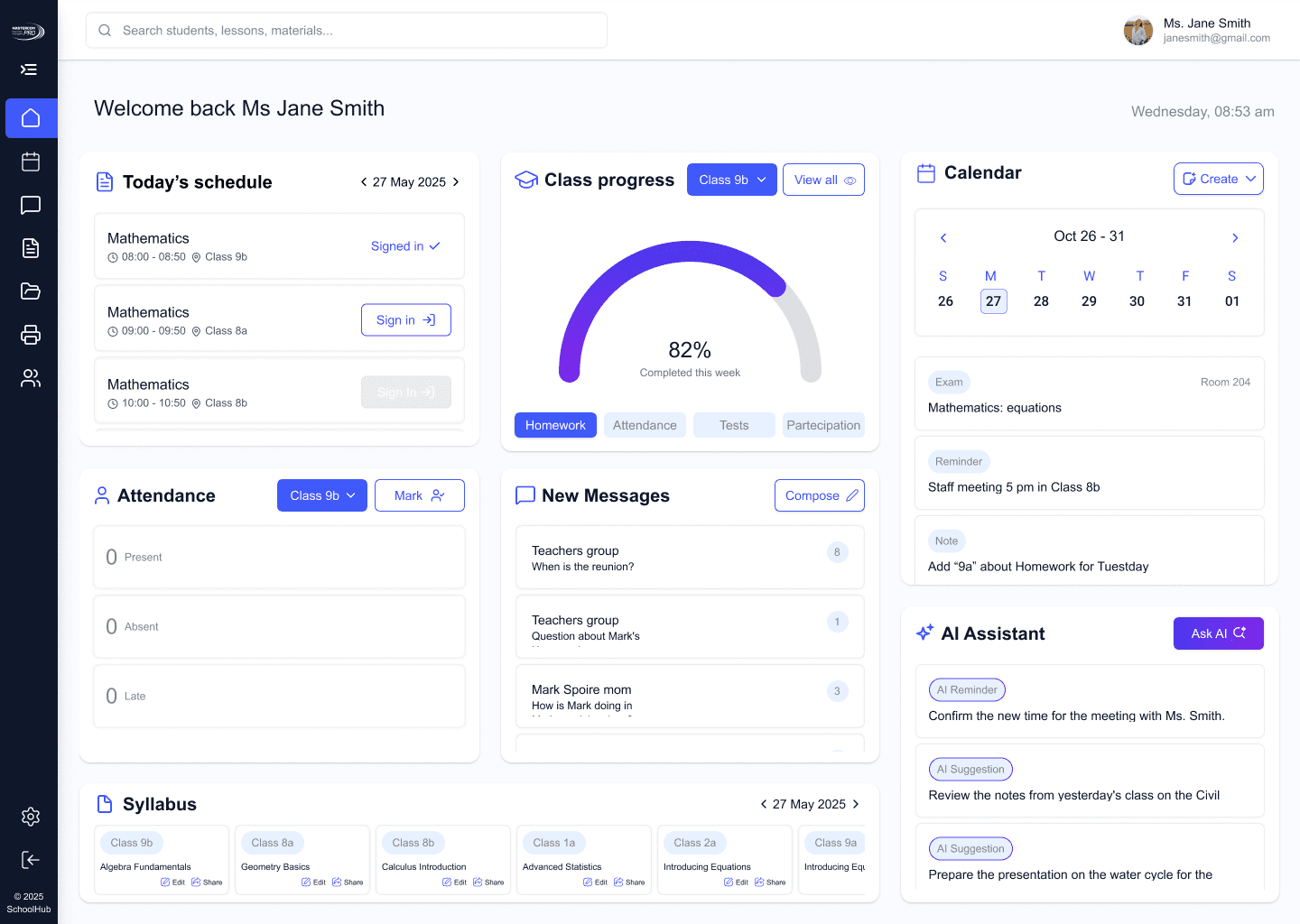
The main dashboard provides teachers with a clear, intuitive overview of everything they need to manage their daily activities, built to minimize cognitive load and maximize efficiency.
01
Tracking System
Displays attendance status with quick view + bulk action support to mark multiple students at once, dramatically accelerating the daily attendance process.

02
Communication Tools
The Messages page centralizes all communication between teachers, parents, and students, with clear conversation grouping, quick replies, and message counters, ensuring efficient and streamlined communication across the entire school ecosystem.

03
Notes & Reminders
A simplified snapshot of the full calendar, showing weekly calendar with upcoming events and reminders, highlighting only the most immediate and important events.


When interacting with the calendar, contextual popups allow the user to create events, tests, or reminders quickly and efficiently.
04
AI Integration
An integrated AI lesson planner assistant helps generate ideas, suggest activities, and support lesson planning.

The AI Integration allows teachers to
generate lesson topics and plans
receive smart activity suggestions
create learning objectives
add homework or exams
access detailed individual reports
save time with AI-assisted planning.

05
Progress Tracking
The Students page allows teachers to easily search student progress, filter by class, view performance badges, monitor grades and attendance percentages, and access detailed individual reports, creating a clear, organized overview of every student’s academic progress.


A visual and interactive overview of student performance trends, with graded indicators ranging from Poor to Excellent, enabling quick academic intuition at a glance.
06
Daily Schedule & Sign-In
A dedicated schedule view where teachers can see today’s lessons, navigate to other days, and easily sign in at the beginning of each class.


A mobile notification was added to provide a sign-in reminder at the start of each lesson, reducing missed check-ins.


User Testing
Insights from real classrooms guided a more useful AI experience.
User testing showed that teachers didn’t need the AI mainly for lesson planning
Users also struggled to find the AI Assistant easily.
Instead, they wanted Ai to be more accessible and provide daily classroom support, such as asking questions about specific students and tracking progress.
Based on these insights
I expanded the AI’s functionality
I placed it next to the calendar to improve discoverability, accessibility, and everyday use.
”
“
This platform empowers teachers with intelligent classroom management tools, reducing friction and saving time, so they can create a better learning experience for their students.
THANK YOU FOR JOINING
#3F58FA
Primary
#E8F1FF
Secondary color
AI Assistant
Tab
Main
Solution
Balancing Complexity with Clarity
The core challenge was to provide teachers with immediate access to all essential tools without the cognitive overload.
I implemented a Modular Dashboard Design where the main screen serves as a "Summary View."
Each widget acts as a gateway: providing real-time snapshots of attendance, grades, and schedules, while allowing users to transition seamlessly into detailed sub-pages for deeper tasks.